JavaScript quirks: a cheat sheet for when your brain refuses to cooperate
JavaScript is the most used language on the web — and one of the most debated among developers.
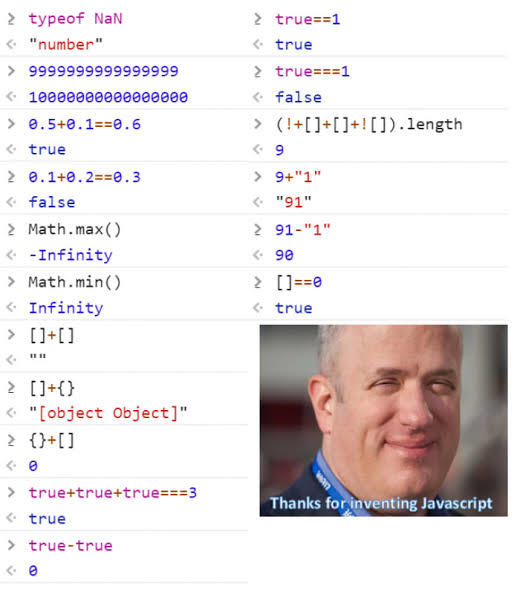
Because it is weakly typed, values automatically convert between types through implicit coercion. People who have not met these rules yet often roast the language with memes like the one above.
This post walks through each example in that meme, explains what the engine is doing, and ends with habits that keep you out of trouble in real code.
Spoiler: you still won't remember all of this when you need it. That's what bookmarks (and
===) are for.
How to read these examples
Before the list, two operators matter everywhere:
+— if either side becomes a string, you get concatenation; otherwise numeric addition.==— abstract equality with coercion.===— same type and same value, no conversion.
Most "WTF" moments are one of: ToPrimitive, ToNumber, IEEE-754, or Abstract Equality Comparison.
1. typeof NaN is "number"
console.log(typeof NaN) // "number"
console.log(NaN === NaN) // false
NaN means "Not a Number" but it only appears when a numeric operation has no meaningful numeric result: 0/0, Infinity/Infinity, Number("abc"), etc.
In ECMAScript, NaN is a special member of the Number type (IEEE-754). Hence typeof NaN === "number". And by spec, NaN is not equal to anything — including itself.
Use Number.isNaN(x) instead of x === NaN.
2. Large integers lose precision
console.log(9999999999999999) // 10000000000000000All JS numbers are 64-bit IEEE-754 floats. Integers are only safe up to Number.MAX_SAFE_INTEGER (2^53 - 1). Beyond that, least significant digits round away.
For big whole numbers, use BigInt:
9999999999999999n // stays exact3. Floating-point arithmetic is not decimal arithmetic
console.log(0.5 + 0.1 == 0.6) // true
console.log(0.1 + 0.2 == 0.3) // false
0.1 and 0.2 cannot be represented exactly in binary floating point. The engine stores tiny errors; sometimes they cancel out (0.5 + 0.1), sometimes they do not (0.1 + 0.2).
For money and comparisons, use integers (cents), Decimal.js, or round explicitly — never assume decimal literals are exact.
4. Math.max() and Math.min() with no arguments
console.log(Math.max()) // -Infinity
console.log(Math.min()) // Infinity
These are not "largest/smallest number in JS." For that you want Number.MAX_VALUE / Number.MIN_VALUE.
Math.max(a, b, …) compares arguments and returns the largest. With zero arguments, the spec says return -Infinity (identity for max). Same idea for Math.min() → Infinity.
So Math.max(100) compares 100 against -Infinity and returns 100.
5. [] + [] → ""
console.log([] + []) // ""+ runs ToPrimitive on both operands. Arrays have no useful valueOf(), so toString() runs:
[].toString()→"""" + ""→""
String wins because both primitives are strings.
6. [] + {} → "[object Object]"
console.log([] + {}) // "[object Object]"Same pipeline:
[]→""{}→"[object Object]"- Concatenation →
"[object Object]"
7. {} + [] → 0 (not the same as above)
console.log({} + []) // "[object Object]" in some contexts
// In an expression statement / console: often 0
This one is parser-sensitive. At the start of a line, {} can be parsed as an empty block, leaving + []. Unary + coerces [] → "" → Number("") → 0.
Always use parentheses if you want to force object literal: ({} + []).
8. Booleans in arithmetic
console.log(true + true + true) // 3
console.log(true - true) // 0
console.log(true + true + true === 3) // true
ToNumber(true) → 1, ToNumber(false) → 0. No strings involved, so you get plain addition: 1 + 1 + 1 === 3.

9. true == 1 vs true === 1
console.log(true == 1) // true
console.log(true === 1) // false==: if one side is boolean, compare ToNumber(boolean) == other → 1 == 1 → true.
===: boolean and number are different types → false immediately.
10. (!+[] + [] + ![]).length → 9
console.log((!+[] + [] + ![]).length) // 9Step by step:
+[]→Number([])→0!0→truetrue + []→"true" + ""→"true"![]→false(empty array is truthy, negated)"true" + false→"truefalse""truefalse".length→ 9
Classic coercion chain — ugly, but deterministic once you know the order.
11. Mixed types: 9 + "1", 91 - "1", [] == 0
console.log(9 + "1") // "91"
console.log(91 - "1") // 90
console.log([] == 0) // true
9 + "1" — string present → concatenation → "91".
91 - "1" — - always numeric → ToNumber("1") → 90.
[] == 0 — [] → "" → ToNumber("") → 0 → 0 == 0 → true.
That last line is why == with arrays catches people in interviews.
Quick reference table
| Expression | Result | Main mechanism |
|---|---|---|
typeof NaN | "number" | NaN is a Number sentinel |
9999999999999999 | 10000000000000000 | IEEE-754 precision limit |
0.1 + 0.2 == 0.3 | false | Binary float rounding |
Math.max() | -Infinity | Empty arg list per spec |
[] + [] | "" | toString + concat |
[] + {} | "[object Object]" | toString + concat |
true + true + true | 3 | ToNumber on booleans |
true == 1 | true | Abstract equality |
true === 1 | false | Strict type check |
[] == 0 | true | "" → 0 |
What I actually do in production
===by default — onlyvalue == nullwhen I mean nullish.- Explicit conversion at boundaries — API input, forms, query strings.
- Never use
+to "add" unknown types — useNumber(), template literals, or a small helper. - TypeScript + ESLint
eqeqeq— catches most of this before merge. - Test the weird case once when you learn it. Future-you will not remember.
const age = Number.parseInt(form.age, 10)
if (Number.isNaN(age)) {
  throw new Error("age must be a number")
}
Further reading
- Understanding JavaScript's Quirky Type Coercion — Royal Bhati
- ECMAScript Number type
- IEEE 754 (Wikipedia)
Closing thought
JavaScript's quirks are not random — they are mostly spec rules from 1995 plus IEEE-754 plus + being both add and concat. You do not need to memorize every row of the abstract equality table.
You need to know coercion exists, read the meme with the steps above, reach for ===, and laugh when production proves why the rest of the industry standardized on strict checks.